

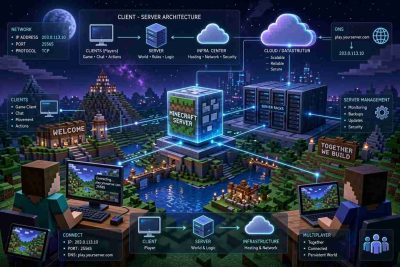
 Minecraft is more than a popular video game. It is also a useful example of how software architecture works in a connected environment. Every time players join a multiplayer world, several systems work together to create a smooth gaming experience. These include Minecraft servers and IP addresses, network connections, databases, and software applications.
Understanding how Minecraft servers operate can help explain important concepts in software architecture. It also shows how different technologies communicate, manage information, and support multiple users at the same time.
Whether you are interested in hosting a Minecraft server or learning about computer networks, understanding these connections provides valuable knowledge about modern software systems.
How Minecraft Servers Work Within Software Architecture
Software architecture refers to the structure of a software system. It explains how different components interact and how information moves between them. A well-designed system should be reliable, secure, and capable of handling its expected workload.
Minecraft multiplayer servers follow many of these principles. Instead of running an entire multiplayer world on each player’s computer, a central server manages the shared environment. Players connect to this server through their Minecraft applications.
The server processes important activities, including player movement, building structures, interacting with objects, and managing game rules. It then sends relevant updates to connected players so everyone can see changes in the world.
This arrangement is an example of client-server architecture, one of the most common models used in software development.
In this setup, the Minecraft application acts as the client, while the Minecraft server handles shared game operations. The client sends requests, and the server processes them before returning the necessary information.
For example, when a player places a block, the client sends information about that action to the server. The server checks whether the action is allowed and updates the game world. Other nearby players then receive information about the change.
This approach helps maintain consistency across the multiplayer environment.
Minecraft servers also demonstrate how software architecture supports different workloads. A small private server may only need modest computing resources. However, a large public server with hundreds of active players may require stronger hardware, better network connections, and more advanced software configurations.
Some Minecraft networks use multiple servers to distribute players across different game modes or worlds. A proxy server can direct connections to the appropriate backend server. This design helps administrators manage traffic and separate workloads.
The same architectural principles appear in business applications, online stores, and cloud-based platforms. These systems divide responsibilities among different components to improve performance and simplify management.
The Role of IP Addresses in Minecraft Server Connections
An IP address is a numerical identifier used to communicate with devices across a network. It allows computers to send information to the correct destination.
When connecting to a Minecraft multiplayer server, players typically enter a server address. This may be a numerical IP address or a domain name that points to the server.
For example, a server might use an address such as 192.0.2.10. This is a documentation example rather than an actual public Minecraft server.
A server may also use a domain name such as play.example.com, making the connection address easier to remember.
Behind the scenes, the Domain Name System, commonly called DNS, helps translate domain names into IP addresses. This process allows players to connect without memorizing numerical addresses.
Minecraft servers also use network ports. A port identifies the specific service that should receive incoming network traffic.
For Minecraft Java Edition, the default server port is 25565, which normally uses TCP. Minecraft Bedrock Edition commonly uses UDP port 19132.
A Java Edition server address may therefore appear as 192.0.2.10:25565. The number after the colon identifies the port used for the connection.
The difference between public and private IP addresses is also important.
A private IP address identifies a device within a local network. For example, a computer hosting Minecraft at home might use an address beginning with 192.168.
A public IP address allows a network to be reached through the internet, provided that routing, firewall settings, and other network conditions permit the connection.
When hosting a Minecraft server at home, administrators may need to configure port forwarding on their router. This allows incoming connections to reach the correct device within the local network.
However, port forwarding should be configured carefully. Opening unnecessary network ports can expose services to unwanted traffic.
Another important consideration is whether an internet service provider uses carrier-grade NAT. This arrangement can prevent traditional inbound connections, even when port forwarding is configured on a home router.
For this reason, some administrators choose dedicated Minecraft hosting services. These providers generally offer server infrastructure, network connectivity, and management tools that simplify deployment.
Understanding IP addresses, DNS, and ports is valuable beyond gaming. These technologies also support websites, cloud applications, remote connections, and many other internet services.
Building a Reliable and Secure Minecraft Server Architecture
Creating a Minecraft server involves more than installing the game software. Administrators must also consider performance, security, storage, and future growth.
One of the first decisions involves choosing the hosting environment.
A locally hosted server may be suitable for a small group of friends. It gives administrators direct control over the computer and its configuration. However, performance depends on the available hardware and internet connection.
Cloud hosting and dedicated servers provide other options. These environments can offer more consistent availability and additional computing resources, depending on the selected service.
Memory and processor performance are especially important. Minecraft servers must process world activity, player interactions, and game calculations continuously.
As more players join, the amount of work increases. Poor resource planning may cause delays, commonly described as server lag.
Administrators can reduce performance problems by adjusting simulation distances, controlling unnecessary background processes, and selecting suitable server software.
Storage design is another important part of Minecraft server architecture.
Minecraft worlds contain information about terrain, structures, player data, and other game elements. These files must be stored reliably to prevent data loss.
Regular backups help protect against hardware failures, accidental deletion, and corrupted world files. Ideally, backup copies should be stored separately from the main server.
Security also deserves attention. Public Minecraft servers may attract unauthorized login attempts, malicious traffic, or disruptive players.
Administrators should keep server software updated, use strong account credentials, and limit access to management tools. Firewalls can help restrict unnecessary network connections.
Minecraft also provides features such as allowlists, permissions, and player moderation tools. These controls help administrators manage who can access the server and what actions players can perform.
For larger Minecraft communities, a distributed architecture may be useful. Multiple backend servers can operate behind a proxy, allowing players to move between different game experiences.
However, adding servers does not automatically improve performance. Each component must be configured correctly, and shared services may require careful coordination.
Monitoring tools can help administrators identify problems before they become serious. Tracking processor usage, memory consumption, network activity, and server performance makes troubleshooting easier.
These practices reflect the same principles used in professional software engineering.
Minecraft servers provide a practical way to understand how software architecture, IP addresses, and network infrastructure work together. The game demonstrates how clients communicate with servers, how information travels across networks, and why reliable system design matters.
By exploring these concepts, beginners can develop a stronger understanding of technologies that power modern online services. What begins as an interest in Minecraft multiplayer hosting can become a useful introduction to networking, cloud computing, and software development.